WorkManager
The WorkManager plugin shows your app's WorkManager work and the events of each run over the API and in the console, cancels work, and prunes finished work.
What the plugin does
- Every work request. Its state, tags, attempts, output, progress, constraints, and schedule.
- The events of each run. The result and its output, the stop reason, and what a worker threw. With work-analytics, the tab also shows the times and attempts of the runs of earlier processes.
- Events live on the heap. The tab records the events from
start()tostop(), also while the app is in the background, and keeps at mostbufferBytesof them (default 1 MiB, by the size of their JSON on the heap). Its listeners forward to yours either way. - Unique names and chains.
WorkInfohas no unique name, so the tab reads the name of each work from WorkManager's own database, through WorkManager's connection, also a name that the app makes for each work, such as the URL of a download. It reads the work that each work waits for, the work before it in a chain ofbeginWith()andthen(), in the same way. The table of the names and its call have been the same since WorkManager 2.0, but the tables and calls are WorkManager's internals: when a later WorkManager changes them, the tab logs it once, labels the work of the names inuniqueNamesonly, and shows no chains.GET items?name=finds the work of any name.
Install
The plugin needs WorkManager 2.12.0 or newer, and is a pair of artifacts, split by variant as
lustro is:
lustro-work      = { group = "io.github.twinsen81", name = "lustro-work",      version.ref = "lustro" }
lustro-work-noop = { group = "io.github.twinsen81", name = "lustro-work-noop", version.ref = "lustro" }
In lustro-work-noop, configure() returns the builder as it is, and the tab reads nothing.
Register the tab
The events come from the listeners that WorkManager 2.12 added to its Configuration, so your
app's configuration goes through the tab. Initialize WorkManager on demand: implement
Configuration.Provider (or call WorkManager.initialize), remove WorkManagerInitializer from
the manifest, and pass the builder through a function of your variant-split bootstrap, so that
src/main names no Lustro type:
// src/main
class App : Application(), Configuration.Provider {
    override val workManagerConfiguration: Configuration
        get() = LustroBootstrap.workManagerConfiguration(this, Configuration.Builder().setWorkerFactory(workerFactory)).build()
}

// src/debug and src/release, LustroBootstrap: the same code against lustro-work and lustro-work-noop
private var work: WorkDebugTab? = null

// WorkManager can ask for its configuration on another thread, before or after start(): one tab for both.
@Synchronized
private fun work(app: Application): WorkDebugTab =
    work ?: WorkDebugTab.create(app, uniqueNames = listOf("sync", "upload")).also { work = it }

fun workManagerConfiguration(app: Application, builder: Configuration.Builder): Configuration.Builder =
    work(app).configure(builder)

fun start(app: Application) {
    Lustro.builder(app).addTab(work(app)).build().start()
}
<provider
    android:name="androidx.startup.InitializationProvider"
    android:authorities="${applicationId}.androidx-startup"
    tools:node="merge">
    <meta-data
        android:name="androidx.work.WorkManagerInitializer"
        android:value="androidx.startup"
        tools:node="remove" />
</provider>
An app whose debug build already has an Application of its own in src/debug, a subclass of
the one in src/main, can implement Configuration.Provider there instead, with the tab in a
field of it, and remove WorkManagerInitializer in src/debug/AndroidManifest.xml only. The
release build then keeps WorkManager's default initializer, and src/main does not change.
From Java, the provider is a method, and every factory has overloads without the trailing parameters:
// src/main
public class App extends Application implements Configuration.Provider {
    @NonNull
    @Override
    public Configuration getWorkManagerConfiguration() {
        return LustroBootstrap.workManagerConfiguration(this, new Configuration.Builder()).build();
    }
}

// src/debug and src/release, LustroBootstrap
private static WorkDebugTab work;

static synchronized WorkDebugTab work(Application app) {
    if (work == null) work = WorkDebugTab.create(app, Arrays.asList("sync", "upload"));
    return work;
}
WorkDebugTab.create(context, uniqueNames, bufferBytes) takes these parameters:
context. A context of your app. The tab keeps its application context, forWorkManager.getInstance.uniqueNames, empty by default. The unique work names of your app, such as"sync". The tab reads the unique name of each work from WorkManager's database. When a later WorkManager changes that database and the tab cannot read it, the tab labels the work of these names only. Pass the names of the work that you look at most.GET items?name=finds the work of any name, also one that is not in this list.bufferBytes, 1 MiB (WorkDebugTab.DEFAULT_BUFFER_BYTES) by default. The most memory that the events of the runs can use, by the size of their JSON on the heap. When a new event goes over it, the oldest events go first, andGET eventscounts them indropped. Make it larger when many workers run and you need the events of a longer time. A value that is 0 or less throwsIllegalArgumentException.
WorkDebugTab.createWithMetrics(context, metrics, uniqueNames, bufferBytes) takes the same
parameters and the work-analytics repository: see below.
- Your listeners keep working.
configure()sets the tab's execution and schedule listeners on the builder and returns it. Each one records the event and then calls the listener that you set before, with the same arguments, so callconfigure()last. What your listener throws reaches WorkManager as without the tab. The listener API is@ExperimentalEventsApi; the opt-in stays insidelustro-work. - The tab never initializes WorkManager. Until your app calls
WorkManager.getInstance, the routes that read work answer503with codework_not_initialized. - When there are no events. The
stateofitems,items/{id}, andeventshaslisteners:installed,missingwhen your configuration did not go throughconfigure()or WorkManager runs with another one (the default initializer is still in the manifest), orunsupportedwhen your WorkManager has listener methods that this version of Lustro does not forward.state.reasonsays what to change. Without WorkManager 2.12.0 or newer, every route answers503with codework_unsupported, after the checks of the request: a bad parameter, or acancelwithout a body, still gets its400.configure()then returns the builder as it is. The message names the version that the app has when the APK has WorkManager's version file,META-INF/androidx.work_work-runtime.version; a packaging exclude ofMETA-INF/*.versionleaves it out. - History on disk with work-analytics. If your app uses
androidx.work:work-analytics, set itsWorkMetricsInfoRepositoryas both of your listeners, and pass it to the tab withWorkDebugTab.createWithMetrics(app, metrics = repository, uniqueNames = ...), which has a name of its own so that an app without work-analytics, in Java too, never needs its types.GET metricsthen reads the enqueue, start, and finish times, durations, attempts, retries, and stop reasons of each run, kept 7 days by default. Lustro never depends on work-analytics: its POM pinswork-runtimeto its own exact version. - work-analytics 2.12.0 can end the app's process. When an event comes for work that has no
open period, the repository inserts period 0 again, and when it closed period 0 before, it
throws
SQLiteConstraintExceptionon WorkManager's thread. That happens when work is cancelled while it runs, also from the console'sPOST cancel(onStoppedcomes afteronCancelled), at the next run of a periodic worker that threw (onExceptionopens no next period), and when the process dies after the repository closed a run but before WorkManager saved the result, so that WorkManager runs it again. In the last two cases, every later run of that work fails the same way, so the app ends at each start until its data is cleared. The sample'sMetricsListenerswraps the repository and catches that exception in every listener method.
Safety options
The WorkManager tab has no safety options. Only POST cancel and POST prune change anything,
and every client with the token can cancel and prune your work. Output data and exceptions can
hold user data. See SECURITY.md.
Console view
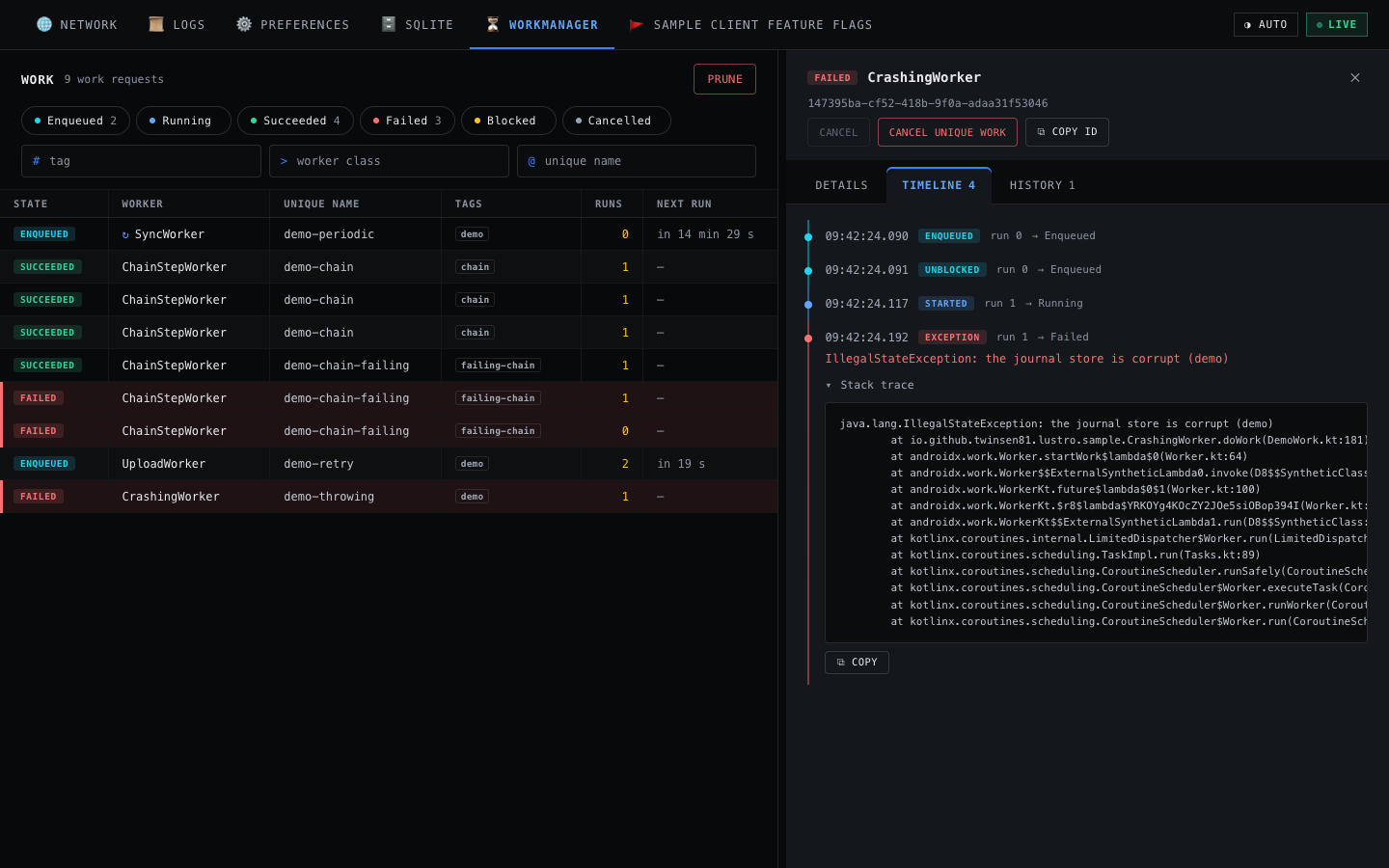
The WorkManager tab lists the work with its state, worker, unique name, tags, attempts, and next run.
- The list. A tag that every work in the list has, such as one that the app puts on all its
work, shows after the tags of each work. A tag that is the work's unique name, which apps add
because
WorkInfohas none, shows only in Details. Blocked work showsafter others: WorkManager runs it when the work before it in its chain has succeeded, which Details lists under Waits for, each a link that opens it. Enqueued work whose next run has passed showswaiting, and says for which constraints: WorkManager runs it when they are met, such as at a change of a content URI that it watches. For periodic work, the attempts are those of the current period: WorkManager sets the count back to 0 when a period ends, so it is 0 after a run that finished. - Filters. The state chips show the count of each state and filter the list by it, and the tag, worker class, and unique name fields go to the route.
- One work. A click on a work opens it. Details has its id, class, tags, constraints, with
the transports and capabilities of a
NetworkRequestthat the app set withsetRequiredNetworkRequest, periodicity, initial delay, next run, attempts, generation, last stop reason, output, and progress, with a bar when the progress is one number from 0 to 100, which the list also shows next torunning. Timeline has the events of its runs, with the result, the output, the stop reason, and a worker's exception with its stack trace, and, when the app registers the Logs tab, a link at the end of each run to the app's log lines from a second before the run to a second after it, which say why a worker that returnedResult.failure()without output failed. History, with work-analytics, has its periods. - Actions. Cancel, Cancel unique work, and Prune ask first, and with work-analytics
the cancel dialogs say that a cancel of running work can end the app's process (see above).
Cancel is off for finished work, and Cancel unique work when all work of the name in
the list has finished, each with the reason as its title; with a tag or class filter, the list
can't tell, and the route answers
cancelled: 0. - Banners. When the listeners are not installed, a banner says why, and how to fix it. While
the routes answer
503, the actions are off; withwork_unsupported, the banner shows the app's WorkManager version when it is known, and the list asks again every 30 s instead of every second.
HTTP routes
GET /api/v1/work/itemspolls the work in the cursor envelope, withstate,tag,class, andnamefilters.GET items/{id}gives one work request with its events and history.GET eventspolls the events in the stream envelope, withid,class, andtypefilters.GET metricsreads work-analytics.POST cancelcancels work byid,name, ortag.POST prunedeletes finished work, asWorkManager.pruneWork()does.
See Agents and automation and
work.openapi.json.
CLI examples
The CLI has no work commands: lustro api reaches the routes.
# The results and failures of the app's workers.
lustro api GET work/events --param type=finished,exception

# The work that failed or was cancelled.
lustro api GET work/items --param state=FAILED,CANCELLED

# One work request, with its events and history.
lustro api GET work/items/<id>

# Cancel the work of a unique name.
lustro api POST work/cancel --body '{"name":"sync"}'
Limits
- Events end with the process. When the system starts your app in the background to run a
worker and stops it before you open the app, the events of that run are lost. The work's state,
attempts, last stop reason, and output stay in WorkManager's snapshot, and a worker's exception
is in logcat (
WM-WorkerWrapper). - Not shown: a work's input data, which WorkManager's public API does not have, and the place
in your code that enqueued the work: the listeners run on WorkManager's own threads. The SQLite
tab can read WorkManager's database, but its schema changes between releases: with
discoverFrom = context, the tab lists it asandroidx.work.workdb, and without discovery, register it asSqliteDb.file("workmanager", File(app.noBackupFilesDir, "androidx.work.workdb")).