Preferences
The Preferences plugin reads and edits your app's SharedPreferences files and Preferences DataStores over the API and in the console, and a poll sees the changes that the app makes.
What the plugin does
- Every entry of a file. For each file and data store that the app registers or that the tab finds, the tab shows every entry by key, with its type, its value as the file's value policy lets it, and its size.
- Live updates. Each file has a cursor, which moves when a value changes, through the tab or
through the app. The tab sees the app's changes with an
OnSharedPreferenceChangeListenerfromstart()tostop(), also while the app is in the background. The tab follows a registered store's data over the same period, and it sees a change to a discovered store when the file's bytes change, on the next poll. - What the app sees of an edit. The app's own instance holds the new value at once, so its
next read gets it, and its own
OnSharedPreferenceChangeListenerruns, as for a change that the app makes. A registered data store is written through the app's own instance, so the app sees that edit at once too.
Install
The plugin is a pair of artifacts, split by variant as lustro is:
lustro-prefs      = { group = "io.github.twinsen81", name = "lustro-prefs",      version.ref = "lustro" }
lustro-prefs-noop = { group = "io.github.twinsen81", name = "lustro-prefs-noop", version.ref = "lustro" }
dependencies {
    debugImplementation(libs.lustro.prefs)
    releaseImplementation(libs.lustro.prefs.noop)
}
DataStore is compileOnly in both artifacts: an app that registers no store needs no DataStore,
and one that does has DataStore 1.0 or newer.
In lustro-prefs-noop, the tab reads no files and no data stores.
Register the tab
val lustro = Lustro.builder(application)
    .addTab(NetworkDebugTab.create(senderClient = client))
    .addTab(
        PrefsDebugTab.create(
            application,
            files = listOf(
                PrefsFile("settings", settingsPrefs, ValuePolicy.VISIBLE),
                PrefsFile("session", encryptedPrefs, ValuePolicy.KEYS_ONLY, readOnly = true),
            ),
            dataStores = listOf(PrefsDataStore("app_state", context.appStateDataStore, unmasked = setOf("auth_method"))),
        ),
    )
    .build()
- Registered files. A
PrefsFilehas the file's name, as you pass it togetSharedPreferences, the instance that the tab reads and edits, a value policy, and areadOnlyflag. The instance can be anEncryptedSharedPreferencesthat decrypts: then the tab shows its plain values, as the policy lets it. The default file ofPreferenceManager.getDefaultSharedPreferences(context)is namedpackageName + "_preferences". androidx'sPreferenceManagerkeeps that name private, so register the file asPrefsFile(context.packageName + "_preferences", PreferenceManager.getDefaultSharedPreferences(context)), or get the name from the framework'sandroid.preference.PreferenceManager.getDefaultSharedPreferencesName(context), which is public from API 24 and deprecated from API 29. - Registered data stores. A
PrefsDataStorehas the store's name, as you pass it topreferencesDataStore, the app's ownDataStore<Preferences>, a value policy, and areadOnlyflag. The tab reads and writes through that instance. DataStore allows one instance for each file in a process, so the tab never opens one of its own. Besides the SharedPreferences types, a store holdsdoublevalues and, from DataStore 1.1,bytes. - Discovered files. With
discover = true, the default, the tab also shows the other files in the app'sshared_prefsdirectory, such as the files of your libraries. It opens each one withgetSharedPreferences, and the platform then keeps it in memory until the process ends. Discovery also finds the other.preferences_pbfiles infiles/datastore, such as the stores of your libraries. The tab reads such a file itself, masked by key.
Safety options
- Value policies.
VISIBLEshows every value.MASK_SENSITIVE, the default, leaves out the value of a key that looks like it holds a secret, such asauth_token,apiKey, orpassword, by the same key check as the Network tab's redaction (SensitiveKeys.isSensitive). It never leaves out aboolean, afloat, or adouble, which an app does not use for a secret: an app that names each setting's key after its string resource, such asshow_original_time_ago_key, keeps the values of its switches. A string, an int, a long, a set, or bytes under such a key stay masked: register a settings file that holds no secret asVISIBLE, or list those keys inunmasked.KEYS_ONLYleaves out every value. The keys, the types, and the sizes always show. - Secrets inside a JSON value. Under
MASK_SENSITIVE, a string value that is a JSON object or array shows with the values of its sensitive fields replaced by[REDACTED], at any depth, by the same check:{"name":"ann","access_token":"[REDACTED]"}. A boolean or anullstays. The entry hasredacted: true, and the console opens such a value empty to edit it, so that the placeholder never goes back into the file. A string that does not parse as one JSON object or array stays as it is. - Keys that are always masked.
maskedon aPrefsFileor aPrefsDataStorelists the keys whose values the tab leaves out under every policy, alsoVISIBLE: a key whose name the check does not find, such as anaccount_infokey that holds a token, or a key that must stay hidden when someone changes the policy. A name there matches a key with exactly that name, in any case, and wins overunmasked. - Exceptions to the mask.
unmaskedon aPrefsFileor aPrefsDataStorelists the keys whose valuesMASK_SENSITIVEshows although the check finds them sensitive, such asauth_method, which holds no secret. A name there matches a key with exactly that name, in any case; it is no pattern. The JSON value of such a key shows whole.VISIBLEandKEYS_ONLYignore it, so a change of the policy never shows more than the policy says, and a discovered file has no exceptions. - Read-only files.
readOnly = trueon aPrefsFileor aPrefsDataStoremakes every edit of it answer403. - Discovered files are read-only. A discovered file is
MASK_SENSITIVEand read-only, because an edit to a library's file can break that library;discoveredReadOnly = falsemakes the discovered files writable, except Lustro's ownlustro_debug, which holds the token. A file that has the keysets ofEncryptedSharedPreferences, read by a plain instance, shows its keys only and is always read-only: an edit would write a plain value into the encrypted file. A discovered data store is always read-only: the app's DataStore keeps its data in memory, would not see an edit to the file, and would write over it. - Every client with the token reads every file, as its value policy lets it, and edits every
file that is not read-only. Set
readOnly = trueon the files that a client must not change. See SECURITY.md.
Console view
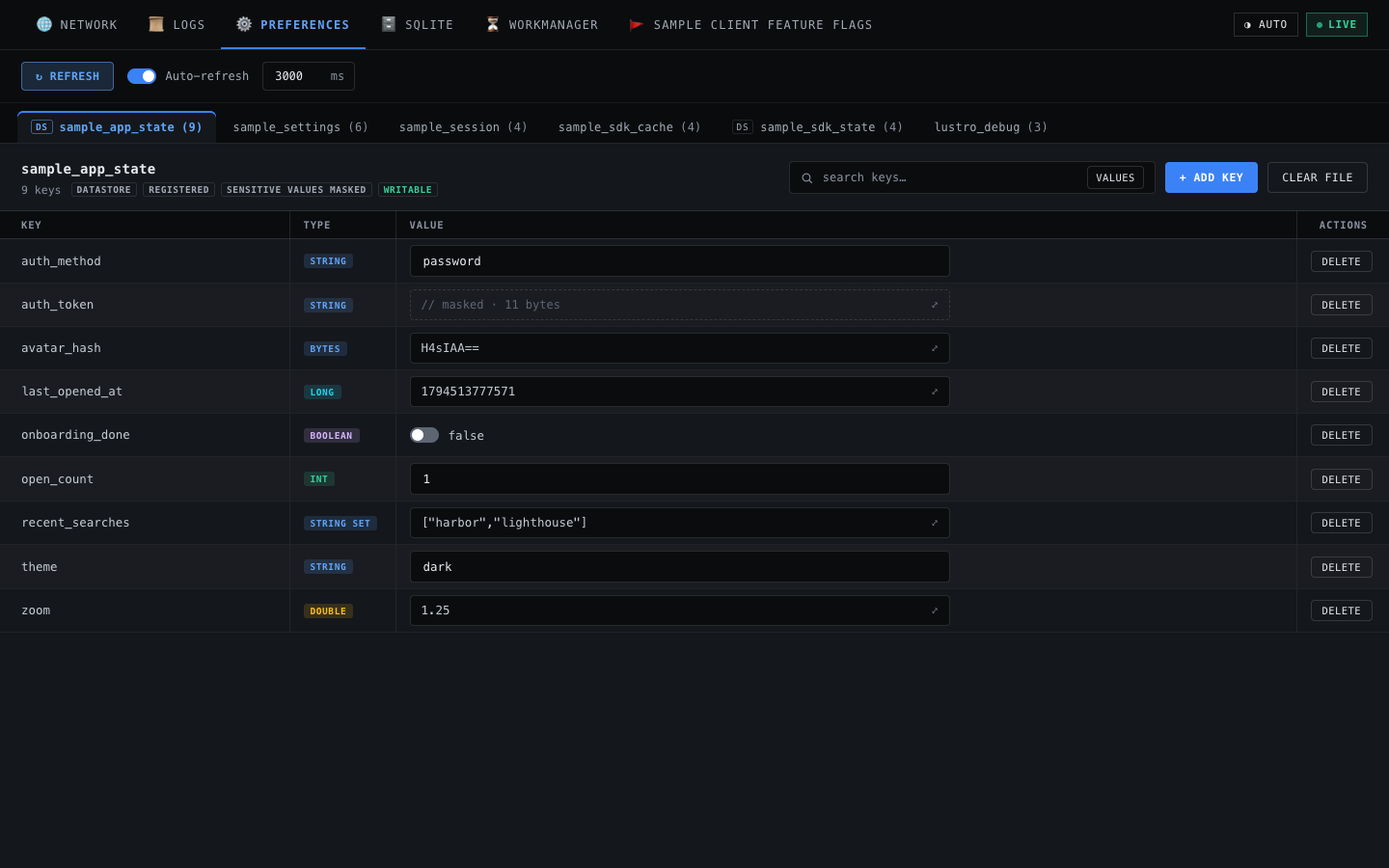
The Preferences tab shows each file as a tab: the files that the app registered first, then
the ones that the tab found, each group the fullest first. It shows each file with its store (a
data store's tab has a DS mark), its policy, whether the app registered it or the tab found it,
and whether it is read-only.
- Search. A key search can also search the values.
- Edit. A boolean, an int, or a short string changes in its row; any other value opens a dialog, with an indented preview of a JSON string or a string set. Add key, Delete, and Clear file ask the routes, and are off, with the reason, for a read-only file.
- Auto-refresh. On by default every 3 s, it shows the app's changes: a poll reads the file again only when its cursor moved.
HTTP routes
GET /api/v1/prefs/files lists the files with their stores, policies, and cursors. A file's
store is shared_prefs or preferences_datastore, and every other route takes it next to
file; without it, a route picks a SharedPreferences file.
GET /api/v1/prefs/entries?file=polls a file in the cursor envelope: every entry, by key, with itstype, itsvalueunless the policy masks it, and its size inbytes. A value longer than 4096 characters is cut there, andGET entry?file=&key=returns it whole. A JSON value whose sensitive fields the policy replaced hasredacted: true.POST editwrites one typed value (string,int,long,float,boolean, orstring_set, and for a data store alsodouble, andbytesas base64),POST deleteremoves a key, andPOST clear(withconfirm: true) empties a file. They return when the file on disk has the change, and answer403for a read-only file.POST editanswers400for an empty key, which is most often a shell variable that did not expand;POST deletetakes one. Their bodies are one JSON object in strict JSON: a body with comments, single quotes, or unquoted names is a400withfield: "body".
See Agents and automation and
prefs.openapi.json.
CLI examples
The CLI has no prefs commands: lustro api reaches the routes.
# The files and data stores, with their policies and cursors.
lustro api GET prefs/files

# Every entry of a SharedPreferences file.
lustro api GET prefs/entries --param file=settings

# Every entry of a Preferences DataStore.
lustro api GET prefs/entries --param store=preferences_datastore --param file=app_state

# Write one value.
lustro api POST prefs/edit --body '{"file":"settings","key":"dark_mode","type":"boolean","value":true}'
Limits
- Changes that the tab does not see. Before API 30,
clear()calls no listener, so a clear by the app shows only with the next change to the file. Another process that writes the file is not seen. - A screen keeps what it read. A screen that read a value before an edit keeps what it shows
until it reads it again: an open androidx
PreferenceFragmentCompatkeeps the values of its preferences in memory, and saving its dialog writes that old value back over the edit, so open the screen again after an edit. - Defaults in code. A setting that the app reads with a default in code, such as
prefs.getBoolean(KEY, true), is not in the file until the app writes it, so the tab can't show it: Add key writes it, with the key and the type that the app reads.