SQLite
The SQLite plugin shows your app's SQLite and Room databases over the API and in the console: the tables and views, their schemas, and pages of rows, sorted and filtered. It runs a client's own statements, read only, on every database, and changes the rows of the databases that you make writable.
What the plugin does
- Databases, tables, and schemas. For each database, its source, file, size, the size of its
-walfile, and schema version (PRAGMA user_version); its tables and views, with the row count of each table and the internal ones flagged; and for each table, its columns, foreign keys, row count,CREATEstatement, and the app's hint. In WAL mode, as Room keeps a database, the-walfile holds the changes until a checkpoint, so it can be larger than the database file. - Pages of rows. A page of rows reads each cell by its own type, as SQLite stores any type in
any column: at most 4096 characters of a text, with the whole length when it is cut, and only
the size of a blob, also of a blob in a
TEXTcolumn. A blob of megabytes does not fill a page or the memory. - Browsing runs only the SQL that the tab builds. A client names a database, a table, and a
column, and the tab checks each name against the database's schema before it puts it in a
statement, as a quoted identifier. A filter value is a bound parameter. Each read stops when
the request times out (
DebugConfig.requestTimeoutMs, 30 s by default). - A client's own statements.
POST queryruns a statement that reads, on every database, andPOST exec,POST edit, andPOST deletewrite to a database that the app registers as writable. See Safety options.
Install
The plugin is a pair of artifacts, split by variant as lustro is:
lustro-sqlite      = { group = "io.github.twinsen81", name = "lustro-sqlite",      version.ref = "lustro" }
lustro-sqlite-noop = { group = "io.github.twinsen81", name = "lustro-sqlite-noop", version.ref = "lustro" }
dependencies {
    debugImplementation(libs.lustro.sqlite)
    releaseImplementation(libs.lustro.sqlite.noop)
}
androidx.sqlite is compileOnly in both artifacts: an app that registers no
SupportSQLiteDatabase needs none, and Room brings it.
In lustro-sqlite-noop, the tab opens no database and never calls the functions.
Register the tab
val lustro = Lustro.builder(application)
    .addTab(NetworkDebugTab.create(senderClient = client))
    .addTab(
        SqliteDebugTab.create(
            databases = listOf(
                SqliteDb.support(
                    "app",
                    writable = true,
                    tableHints = mapOf("notes" to TableHint("NoteEntity", "A note that the user wrote.")),
                    onWrite = { appDatabase.invalidationTracker.refreshVersionsAsync() },
                    unmasked = setOf("oauthScopes"),
                ) { appDatabase.openHelper.writableDatabase },
                SqliteDb.file("cache", application.getDatabasePath("cache.db"), valuePolicy = SqliteValuePolicy.VISIBLE),
            ),
            discoverFrom = application,
        ),
    )
    .build()
- The app's open handle.
SqliteDb.supporttakes a function that returns the app'sSupportSQLiteDatabase: for Room,roomDb.openHelper.writableDatabase, which works for an encrypted Room database too.SqliteDb.frameworktakes one that returns a frameworkSQLiteDatabase, such as aSQLiteOpenHelper's. The tab calls the function on a request's thread for each read, reads through the app's connection pool, and never closes the handle. Use a handle for each database that the app has open: a second connection that stays open to the same file can conflict with the app's, mostly in WAL mode. - A file.
SqliteDb.filetakes a database file that the tab opens read-only for each request, and closes after it, such as the database of a library. The engine refuses every write on that connection, and in WAL mode it does not block the app's writer. A file in which SQLite finds corruption is reported and left on disk, where the platform's default error handler would delete it. The tab does not see the file of a live handle before it reads, so register each file once. The tab opens a file with the platform's SQLite, which keeps the locks of the app's other connections to it through that SQLite. Do not register a file that the app opens with another copy of SQLite, such as Room's bundled driver or SQLCipher: on Android, closing any descriptor of a file drops the process's POSIX locks on it, and only the SQLite that holds them works around that. See How To Corrupt An SQLite Database File. - Discovery. With
discoverFrom = context, the tab also lists the other database files in the app'sdatabasesdirectory, such as those of your libraries, by file name, and then those innoBackupFilesDir, such as WorkManager'sandroidx.work.workdb. A file innoBackupFilesDirwhose name a registration or a file indatabasesalready has is listed asno_backup/<file name>. It looks in no other directory. It lists the directories on each request, so it finds a file that the app creates later, and leaves out a file that a registration stands for, SQLite's journal, WAL, and lock files, and a file that is not a SQLite database. It looks only at the files that no registration stands for. For a file that the process holds open, it asks the platform's SQLite. For any other file, it reads the first 16 bytes and compares them with SQLite's header, so that SQLite does not see a file that is not a database: Samsung's build of SQLite writes the first page of such a file to logcat, which would put the content of a file such as Firebase'sPersistedInstallation.<id>.json, with its tokens, into the log. A file with SQLite's header and a damaged page after it is listed, with SQLite's error in itserrorfield. A discovered file is read as aSqliteDb.file, so leave discovery off when a directory has a database that the app opens with another copy of SQLite. Discovery is off by default. - Hints.
tableHintsgives a table the name of the class that maps it and one line on what a row is, for an agent that reads the database without your code. -
The app's observers. Room's
InvalidationTrackerlooks for changes after Room's own transactions only, so an open screen that a DAO'sFloworLiveDatafills does not show a change that the tab writes until the app's next write through Room. An app on aSQLiteOpenHelperof its own reloads a screen on an event of its own, which a write through the tab does not send either.SqliteDb.supportandSqliteDb.frameworktakeonWrite, aRunnable, which the tab calls after eachexec,edit, ordeletethat committed. For Room, pass Room's public refresh call, which is there for writes that do not go through Room:SqliteDb.support( "app", writable = true, onWrite = { appDatabase.invalidationTracker.refreshVersionsAsync() }, ) { appDatabase.openHelper.writableDatabase }For an app on its own
SQLiteOpenHelper, post the event that its screens reload on. From Java, which has no named arguments, give the parameters beforeonWritetoo:SqliteDb.framework("app", true, Collections.emptyMap(), SqliteValuePolicy.MASK_SENSITIVE, () -> changes.notifyDatabaseChanged(), () -> openHelper.getWritableDatabase())The sample registers its Room database so, and its SQLite screen shows a Room
Flowthat changes at once when the console edits a row. WhatonWritethrows is logged, and the write stays committed.
Safety options
- Writes are opt-in for each database.
writable,falseby default, says whether a client may change the database through the tab. A file is never writable.POST execruns a statement that writes, andPOST editandPOST deletechange or delete one row by its rowid or primary key, through the app's handle, in a transaction of their own, and only on awritabledatabase: any other answers 403.execrefuses a statement that returns rows, such as aSELECT, before it runs: read it withquery. Bothqueryandexecrefuse the statements that would leave a transaction or a setting on the app's connection (BEGIN,SAVEPOINT, and the other transaction statements,ATTACH,DETACH,VACUUM, and, inexec, everyPRAGMA), andqueryrefuses a pragma with a value, such asPRAGMA journal_mode=DELETE, which sets it, and the pragmas that set a value for the whole process, such ashard_heap_limit. A pragma whose value names what to read, such asPRAGMA table_info(notes), runs inquery. - A client's statement reads through a read-only connection.
POST queryruns it on a connection that SQLite opens withOPEN_READONLYto the database's file, for one request, and never on the app's handle, on which Android'srawQuerywould run aDELETEtoo. SQLite refuses every write there, for every database. - Value policies.
valuePolicyisSqliteValuePolicy.MASK_SENSITIVEby default, as in the Preferences tab: the tab leaves out the values of a column whose name looks like it holds a secret, such asaccess_token,clientSecret, orpassword, by the same name check as the Network tab's redaction (SensitiveKeys.isSensitive).VISIBLEshows every value. A discovered file isMASK_SENSITIVE. The check reads only the column's name, so a table that keeps the name of a secret in a row, such as HTTP headers innameandvaluecolumns, shows the value of anAuthorizationrow. A masked cell has only its storage class,{ "type": "text", "masked": true }, and the tab never sends its value (GET rowsdoes not read it at all); aNULLstaysNULL.GET rowsmasks by the table's column, and its filter does not search a masked column.POST querymasks by the result's column name, because Android does not say which table column a result column comes from:length(access_token)is masked by its name, but an alias, such asSELECT access_token AS t, shows the value. So the policy keeps secrets off the screen and out of an agent's output, but it does not stop a client that has the token: to keep a database's values from every client, do not register it. The console does not edit a masked column. A column named onlykey, as in a key-value table such as WorkManager'sPreference, is not masked, so that the rows show their names.GET schemaalways shows a column's default value and theCREATEstatement, also of a masked column. - Exceptions to the mask.
unmaskedon eachSqliteDbfactory lists the columns whose valuesMASK_SENSITIVEshows although their names look like they hold a secret, such as anoauthScopescolumn, which hasauthin its name. A name there matches a column with exactly that name, in any case; it is no pattern. Such a column is notmaskedinGET schema,GET rowssends and filters its values, the console shows, copies, and edits them, andPOST queryshows a result column of that name. An expression of the column, such aslength(oauthScopes), has another name, so it stays masked.VISIBLEshows every value anyway, and a discovered file has no exceptions. - Every client with the token reads every registered database, and writes every writable one. Register only the databases that you want to show. See SECURITY.md.
Console view
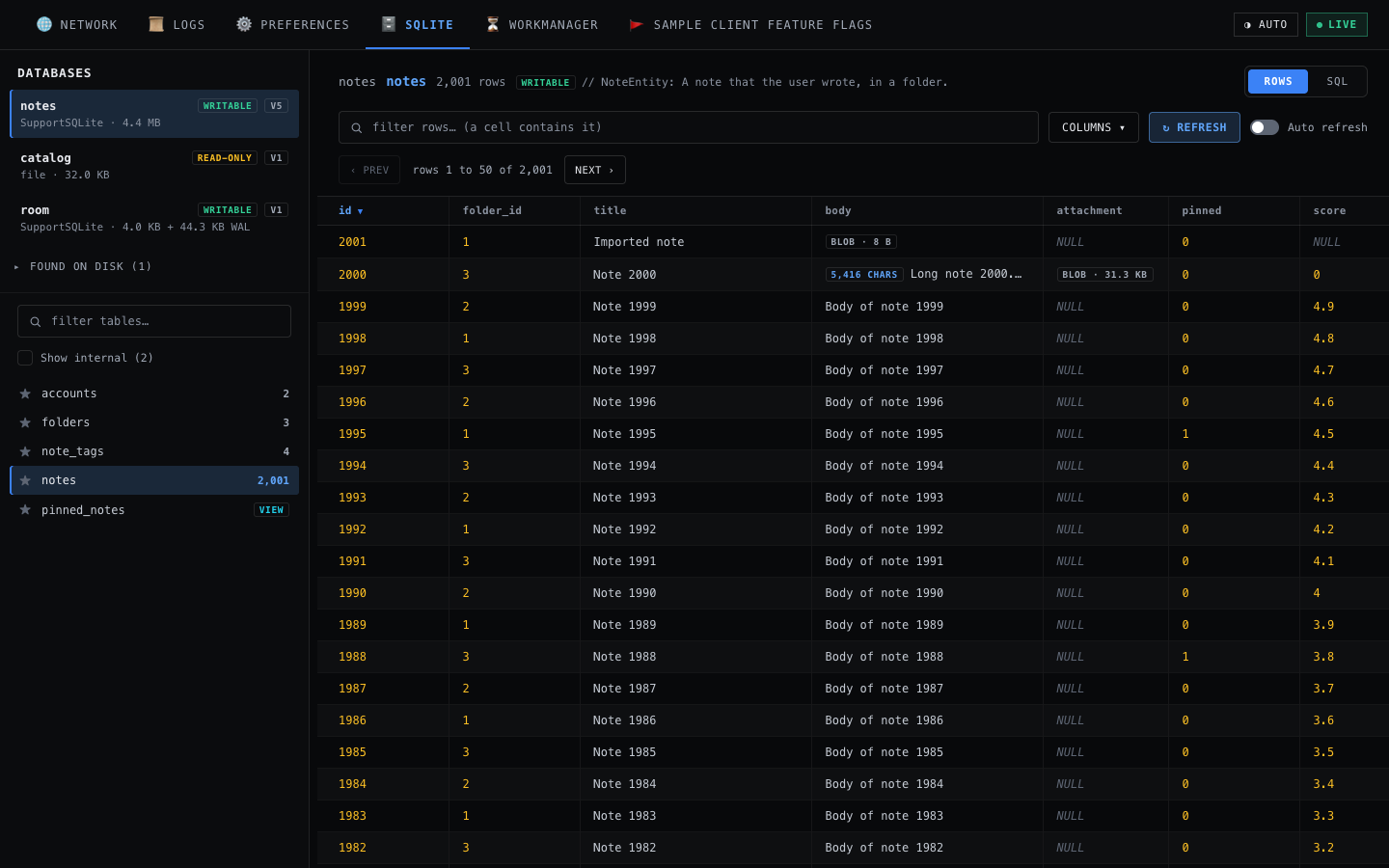
The SQLite tab lists the databases in the app's order, with the found ones in a group of their
own, each with its size and the size of its -wal file, and each one's tables, with a filter, the
internal tables behind Show internal, and a ★ to pin a table to the top.
- Rows. A table's rows show a page at a time: Prev and Next page through them, a
filter finds the rows in which a cell contains a text, a click on a header sorts ascending,
descending, then not, and a right-click or the Columns menu hides a column. Your browser
keeps the hidden columns and the widths for each table. A cut text opens whole, read with
query. A masked cell showsmaskedand its type. - One row. A click on a row opens it, to edit, set a column to
NULL, or delete the row in a writable database, and to read and copy in any other; a masked column is locked there. - Auto refresh reads the page again every 2 s.
- SQL. The SQL view runs a statement with
query; Run as write, only for a writable database, sends it toexec. A refused statement shows the route's error.
HTTP routes
GET /api/v1/sqlite/databaseslists the databases with their source, file, size, the size of the-walfile, and schema version.GET tables?db=lists the tables and views, with the row count of each table, and flags the internal ones (sqlite_*,android_metadata,room_master_table, and the shadow tables of a full-text or R*Tree index). A table that the tab can't read, or can't count in time, has anerrorinstead of its row count.GET schema?db=&table=gives the columns, the foreign keys, the row count, theCREATEstatement, and the hint.GET rows?db=&table=returns a page in the pagination envelope{ items, nextCursor }: 50 rows by default,limitup to 500, afiltertext that any cell can contain, and asortcolumn withdir=asc|desc.POST queryandPOST exectake{ db, sql }, andPOST editandPOST deletetake{ db, table, rowid }or{ db, table, key }, withvaluesfor an edit.
See Agents and automation and
sqlite.openapi.json,
the document that the tab's route declarations make.
CLI examples
The CLI has no sqlite commands: lustro api reaches the routes.
# The databases, and the tables of one.
lustro api GET sqlite/databases
lustro api GET sqlite/tables --param db=app

# The newest rows of a table.
lustro api GET sqlite/rows --param db=app --param table=notes --param sort=created_at --param dir=desc

# A statement that reads, on any database.
lustro api POST sqlite/query --body '{"db":"app","sql":"SELECT count(*) FROM notes"}'

# A statement that writes, on a writable database.
lustro api POST sqlite/exec --body '{"db":"app","sql":"UPDATE notes SET pinned = 1 WHERE id = 3"}'
Limits
- Statements that the tab can't run. A database in memory, and a live handle on another copy
of SQLite than the platform's, such as SQLCipher's, take no
query: browse them withGET rows. Aqueryresult has at most 1000 rows, and fewer when their texts reach 4 Mi characters in all;truncatedthen says that rows were left out. Each text in it is whole. - A time limit without WAL. On a database that is not in WAL mode, a
POST querystatement stops after 2 s, and on a file database so does each read of theGETroutes: the app's writes wait for the lock of the tab's connection, and Android fails a write that waited 2.5 s. - Files left by a read. In WAL mode, SQLite can leave the empty
-waland-shmfiles of aSqliteDb.filedatabase after the tab reads it.