Screen
The Screen plugin gives an agent or a script your app's UI as a tree, over the API: each window
of your app's process, and in each, the classic Views and the Compose semantics nodes, with their
test tags, text, bounds, states, and actions. The tab reads them in your app's process, in
milliseconds, where uiautomator dump takes a second or more for each read.
What the plugin does
- Every window of the app.
GET /api/v1/screen/treereturns the activity's window and each dialog, popup, and bottom sheet over it, in the order your app added them. From API 29 the tab lists them withWindowInspector; before that it readsWindowManagerGlobalby reflection, as Espresso does, and when that fails, the windows of the started activities, without their dialogs and popups. Each window says whether it has the window focus. When none has it, a window of another app is on top, such as a permission dialog or the chooser, and the tree does not have that window. - Compose and Views. The tab reads the View tree of every window, and the semantics tree of
each Compose host in it: the merged tree by default, as accessibility services see it, and the
unmerged one with
merged=false. Every test tag is in it, whether your app setstestTagsAsResourceIdor not. - What a node has. Its id, which stays the same from read to read; its test tag, text,
content description, editable text, and role; its bounds in the window and on the screen; the
part of it that is visible on the screen, or
nullwhen no part of it is, as for a row scrolled out of view; whether it is enabled, focused, selected, and on or off; the actions that drive it, such asOnClick,SetText, andScrollBy; and its scroll position and range. A password field has one dot for each character, as the screen shows it. - On the main thread.
settle=500reads the tree on each frame until two reads in a row are the same and the window focus is at rest, for up to 500 ms, for a screen that still changes: the window manager moves the focus some frames after a dialog opens or closes, 200 ms and more on a physical device. A main thread that does not run the read within five seconds gets the client a504with the codemain_thread_blocked, so a script does not wait for an app that does not respond.
Install
The plugin is a pair of artifacts, split by variant as lustro is:
lustro-screen      = { group = "io.github.twinsen81", name = "lustro-screen",      version.ref = "lustro" }
lustro-screen-noop = { group = "io.github.twinsen81", name = "lustro-screen-noop", version.ref = "lustro" }
dependencies {
    debugImplementation(libs.lustro.screen)
    releaseImplementation(libs.lustro.screen.noop)
}
Compose is optional: the tab compiles against Compose UI 1.6.0 as compileOnly, checks at
runtime that your app has Compose, and in an app without it reads the Views only.
In lustro-screen-noop, the tab reads no window and never calls the provider.
Register the tab
val lustro = Lustro.builder(application)
    .addTab(NetworkDebugTab.create(senderClient = client))
    // The lambda is optional: what only your app knows about the screen, as JSON.
    .addTab(ScreenDebugTab.create(application) { """{"route":"${navigator.currentRoute}"}""" })
    .build()
- Your app's context. A
ScreenContextProviderreturns what only your app knows, such as its navigation back stack, as JSON. The tab calls it on the main thread after each read, and the tree carries it ascontext. - Create the tab in
Application.onCreate. The tab registers activity lifecycle callbacks when you create it, and Android has no public API to find the activities that started before. Before API 29, when the tab can't readWindowManagerGlobal, it reads the windows of the started activities, andwindowSourceisactivities. A tab that your app creates later, for example when the user turns the server on in a settings screen, then has no window of an activity that was already started:GET treereturns no window until that activity stops and starts again, for example after the user goes to the home screen and back. From API 29, and when the reflection works, the time of the call changes nothing.
Safety options
The Screen tab has no safety options: it only reads, and it has no route that changes the app. Every client with the token reads the screen, with what it shows, but the text of password fields. See SECURITY.md.
Console view
The Screen tab has no console view yet: it is not in the tab bar, and _meta lists it. See
Sample output for what it gives for a screen of the sample app.
HTTP routes
GET /api/v1/screen/tree returns the windows and their nodes. merged=false gives the unmerged
semantics tree. settle=MS goes from 0 to 10000: 0, the default, reads once, and a larger
value reads until the screen is at rest, for up to MS. See Agents and automation and
screen.openapi.json.
CLI examples
lustro screen tree prints each window and the nodes on the screen that have a text, a tag, a
role, an action, or a state, one line each, with the part of each node that is on the screen, in
uiautomator's bounds format.
# The windows, and the nodes on the screen.
lustro screen tree

# Read after a tap, when the screen is at rest.
lustro screen tree --settle 500

# Every node of the unmerged tree.
lustro screen tree --unmerged --all

# The whole response, as JSON.
lustro screen tree --json
A script that reads the tree in a loop sends the GET itself, with a token and a forward that it keeps: see Agents and automation.
Sample output
The sample app's main screen, on an emulator with API 29, at 1080 × 2400 pixels:
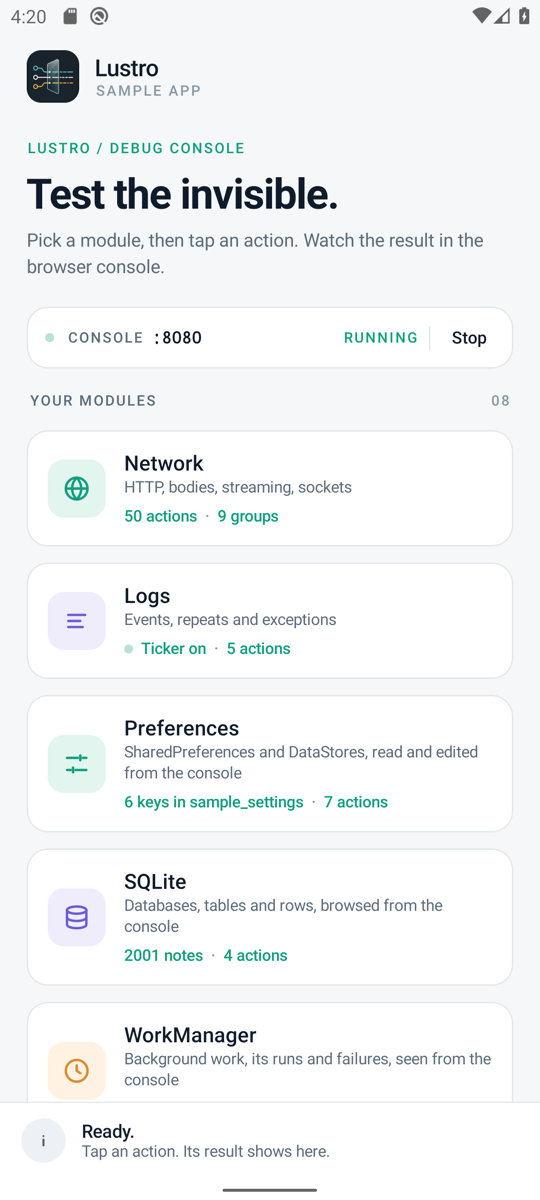
lustro screen tree prints this for it:
window 0  activity  io.github.twinsen81.lustro.sample/io.github.twinsen81.lustro.sample.MainActivity  focus  [0,0][1080,2400]
  c5.6  node  scroll-v 0/927  scroll  [0,63][1080,2205]
    c5.12  node  "Lustro"  [190,108][319,164]
    c5.13  node  "SAMPLE APP"  [190,164][403,198]
    c5.16  node  "LUSTRO / DEBUG CONSOLE"  [53,279][490,313]
    c5.18  node  "Test the invisible."  [53,339][679,438]
    c5.20  node  "Pick a module, then tap an action. Watch the result in the …"  [53,459][1027,555]
    c5.22  Button  "CONSOLE / :8080 / RUNNING"  #Console strip  click  [53,613][1027,737]
      c5.33  Button  "Stop"  #Stop the Lustro server  click  [872,634][1006,716]
    c5.41  node  "YOUR MODULES"  [58,784][981,818]
    c5.42  node  "08"  [981,784][1022,818]
    c5.43  Button  "Network / HTTP, bodies, streaming, sockets / 50 actions / ·…"  #Network  click  [53,860][1027,1093]
    c5.57  Button  "Logs / Events, repeats and exceptions / Ticker on / · / 5 a…"  #Logs  click  [53,1125][1027,1358]
    c5.72  Button  "Preferences / SharedPreferences and DataStores, read and ed…"  #Preferences  click  [53,1390][1027,1665]
    c5.86  Button  "SQLite / Databases, tables and rows, browsed from the conso…"  #SQLite  click  [53,1697][1027,1972]
    c5.100  Button  "WorkManager / Background work, its runs and failures, seen …"  #WorkManager  clipped  click  [53,2004][1027,2205]
  c5.155  node  desc="Ready"  #result-outcome  [42,2237][131,2326]
  c5.163  node  "Ready."  #result  [163,2242][269,2285]
  c5.164  node  "Tap an action. Its result shows here."  [163,2285][660,2322]
context: {"screen":"home","stack":["home"],"historyOpen":false}
How to read it:
- The window line. The index of the window, its kind, its title when it has one,
focuswhen it has the window focus orno-focuswhen it does not,hiddenfor a window that is not visible, and its bounds. A dialog or a bottom sheet over the activity is a second window line, with its own nodes, and the activity's line then saysno-focus. - A node line. The node's id; its role, else the last part of its class name, such as
TextView, elsenode; its texts; its test tag after#; its states and actions; and the part of it that is on the screen. An id that starts withvis a View. An id that starts withcis a Compose semantics node:c5.33is a node of the Compose host Viewv5. A Compose node has no class name, so one without a role saysnode. The indent shows the nearest ancestor that the output has a line for: without--all, the containers between them have no line. - Texts. In the merged tree, a node also has the texts of its children, and the CLI joins
them with
/, so"CONSOLE / :8080 / RUNNING"is three texts."LUSTRO / DEBUG CONSOLE"is one text that has a slash:--jsonand--unmergedshow the difference. The CLI cuts a text at 60 characters. - States and actions.
clickisOnClick, andscrollisScrollBy.scroll-v 0/927is the vertical scroll position and its maximum, in pixels.clippedmarks a node that is only partly on the screen: the listc5.6ends at y=2205, above the result bar, so the line of the WorkManager card ends there too. Itsboundsin--jsonend at y=2279. - What is not there. The Screen, Feature flags, and Console cards are further down the list,
and the lines leave them out.
--allprints them with(not on screen). The status bar and the navigation bar belong to the system, not to the app. context. What the sample'sScreenContextProviderreturned: its own navigation state.
--json gives each node in full. The Stop button, from the same read:
{
  "id": "c5.33",
  "parent": "c5.22",
  "kind": "compose",
  "testTag": "Stop the Lustro server",
  "text": ["Stop"],
  "role": "Button",
  "bounds": { "left": 872, "top": 634, "right": 1006, "bottom": 716 },
  "screenBounds": { "left": 872, "top": 634, "right": 1006, "bottom": 716 },
  "visibleBounds": { "left": 872, "top": 634, "right": 1006, "bottom": 716 },
  "clickable": true,
  "actions": ["OnClick"]
}
To press it, tap the middle of its visibleBounds: adb shell input tap 939 675. The whole
response for this screen is about 9 KB. It also has merged, density, compose, and
windowSource, which says how the tab found the windows: inspector from API 29, and
reflection or activities before.
Limits
- Only the app's windows. Permission dialogs, the chooser and the share sheet, the keyboard,
notifications, the text toasts that the system shows from API 30, and the page in a WebView
are not in the tree: read them with
uiautomator.