OkHttp capture setup
lustro.networkInterceptor() returns an OkHttp application interceptor. The name has
"network" in it, but you add it with addInterceptor, not with addNetworkInterceptor. It
gives the captured traffic to the registered NetworkDebugTab. When no Network tab is registered,
it passes each call on and records nothing.
OkHttpClient.Builder()
    .addInterceptor(authInterceptor)            // your interceptors that mutate URL/headers/body
    .addInterceptor(lustro.networkInterceptor()) // add Lustro AFTER them
    .build()
Ordering matters. Add Lustro's interceptor after any application interceptors that
rewrite the URL, headers, or body, so capture, mock matching, classification, and throttling all
see the final application-level request. As an application interceptor it sees one call, not each
request OkHttp sends for it: a redirect that OkHttp follows is one transaction, whose url is what
your code requested. The Network tab shows where the response came from (finalUrl), and each
redirect and authentication challenge on the way (priorResponses), with its status.
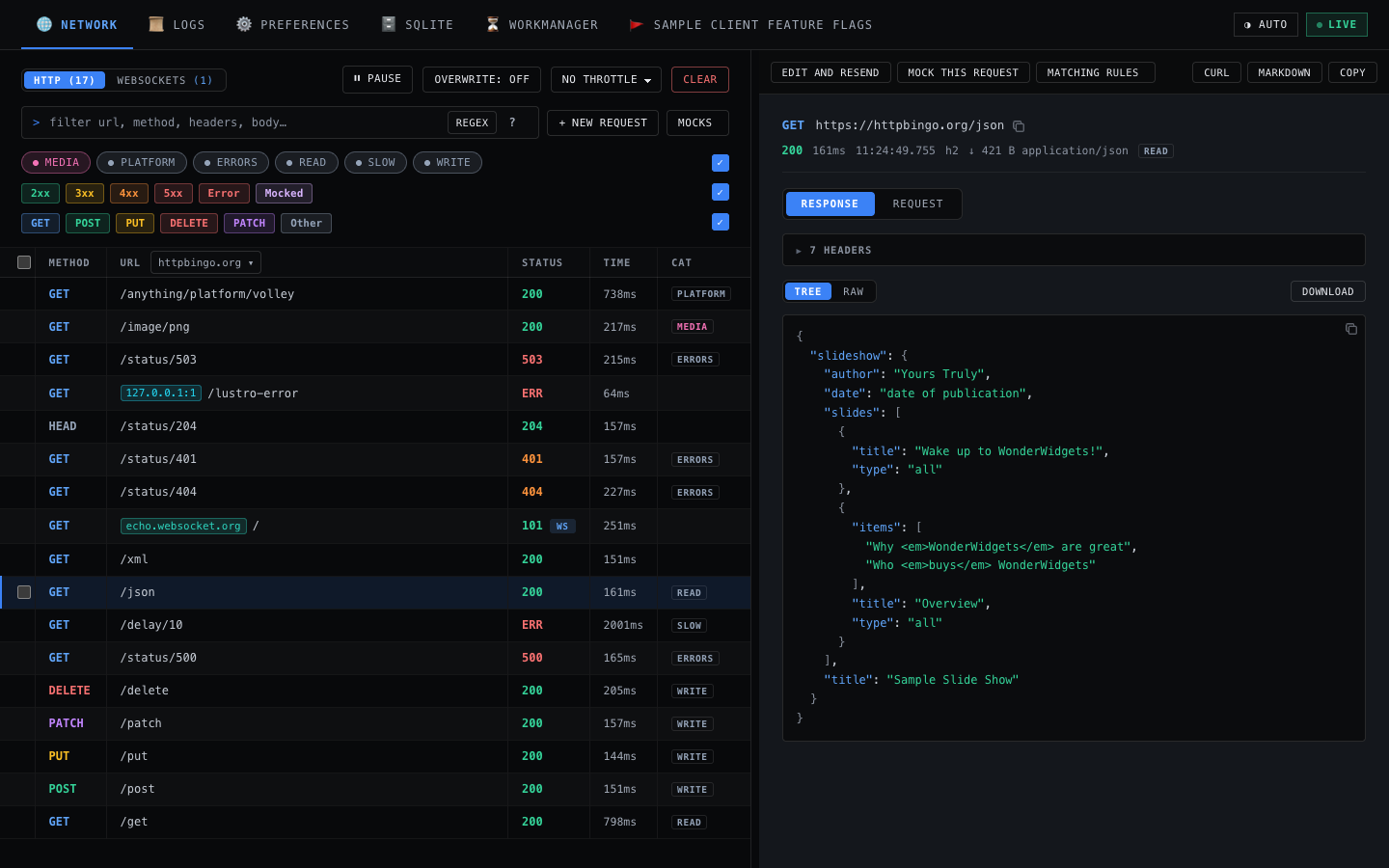
Capture doesn't hold up the call. The interceptor copies what it captures and returns;
redaction, classification, and storing run on a background thread. A request's row shows in the
Network tab a moment after the call starts, as in flight, and gets its response a moment after it
completes. During a burst of large bodies, once about 4 MB of
captured text is waiting, calls capture on their own thread until that one catches up, which
keeps memory bounded. A body that capture doesn't read whole, such as a download or a body past
the cap, reaches your code as it would without Lustro, and the request shows as in flight until
your code reads to its end or closes it, so its duration covers the whole body. An event stream
(text/event-stream) or a JSON stream (application/x-ndjson, JSON Lines, application/json-seq,
application/stream+json) can stay open with no end, so Lustro doesn't read it ahead: it captures
the stream as your code reads it, and the Network tab shows each event as it arrives.
A request body is copied as OkHttp sends it. Lustro doesn't write your request body a second
time to capture it, so the body is written as it would be without Lustro: an upload's progress
listener runs once, a file is read once, and a body that reads a stream once still works. The
request is listed with the body's size first, and its bytes once OkHttp has sent them; a request
that fails before it sends the body keeps the size alone. A mocked request isn't sent, so Lustro
writes its body once to capture it. A FormBody is in memory, and Lustro writes it once more
for capture, as it does the text parts of a MultipartBody. A request body with no
Content-Type is captured as text, as platform capture does: apps send a message or JSON
without one.
Compressed bodies are captured decoded. OkHttp inflates a gzip response on its own only when
it added Accept-Encoding itself. If your app sets that header, or compresses request bodies in an
interceptor added before Lustro's, the interceptor sees the compressed bytes. Lustro inflates a body
in gzip, x-gzip, or deflate before it stores it, and keeps at most
DebugConfig.maxBodyCaptureBytes of the inflated body; the size the Network tab shows for it is the
compressed size. Platform HttpURLConnection capture does the same. Lustro does not decode Brotli
(br) or any other encoding: for such a body it keeps only the size, and the Network tab says why.
To see Brotli bodies from OkHttp, add OkHttp's BrotliInterceptor (from okhttp-brotli), or the
CompressionInterceptor of OkHttp 5, after Lustro's interceptor: it then decodes the body before
Lustro captures it, as OkHttp does with its own gzip. Event streams are captured as they arrive, without decoding.
Multipart uploads are captured part by part. For an OkHttp MultipartBody, such as the body of
a Retrofit @Multipart call, Lustro stores the body as multipart text: each part's headers, the
value of each text part, and, for a file or any other part that is not text, one line with its type
and size in place of its bytes. The default redactor masks a part whose field name is sensitive.
The Network tab shows the parts as a table, and the cURL button copies a command with a -F
option for each part,
naming the file to send for a part whose bytes Lustro did not keep. When Lustro keeps no body at
all, as for an octet stream, the Network tab shows its size and type and says that it was not
stored.
Leave traffic out with a capture filter. Pass a NetworkCaptureFilter as captureFilter,
and Lustro asks it about each request before it captures anything. A request it returns false
for is never stored, so it costs no redaction and no part of the capture budget. Use it for
traffic you never inspect, such as calls to an analytics host, or for requests your app marks
with a header of its own:
NetworkDebugTab.create(
    senderClient = client,
    captureFilter = NetworkCaptureFilter.of("Analytics calls, and requests marked X-No-Capture") { request ->
        request.url.toHttpUrlOrNull()?.host != "analytics.example.com" &&
            request.headers.get("X-No-Capture") == null
    },
)
The description is required, because a teammate who doesn't know about your filter needs it. Once
the filter skips a request, the Network tab shows a ⚠ next to the HTTP and WebSockets buttons, with
the number skipped in its tooltip, and a click on it shows the description, how many requests the
filter skipped, and how many it failed on. The counts start again when you clear the list. The poll
state reports the same as captureFilter, for the CLI and agents.
The filter decides capture only: mock rules and the throttle still apply to a request it skips,
as they do while capture is paused. It applies to platform HttpURLConnection capture too. It
runs on the thread that makes the call, so keep it fast and thread-safe, and it sees the URL and
headers before redaction. A filter that throws doesn't fail the call: the request is captured,
and the first failure is logged. A marker header still goes out with the request.
To label traffic instead of leaving it out, pass a NetworkClassifier as classifier. To mask
more than the default redactor does, pass a Redactor as redactor.
Redaction and categories shows both, with examples.